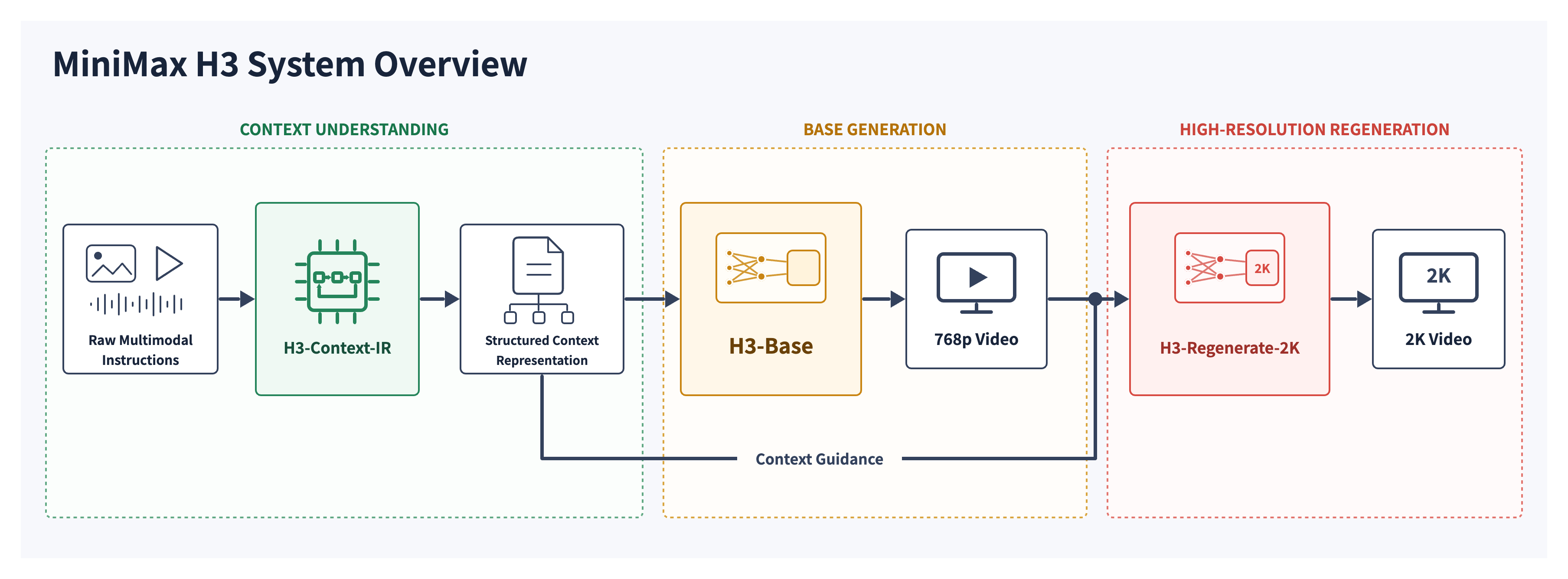
Most video models treat your prompt as a wish. MiniMax H3 treats it as a spec. Give it “Reference the Hitchcock camera movement from Video 1, have the character in Image 2 sing, with the vocals matching Audio 3” and it plans the whole audiovisual timeline before generating a single frame: the shots, the cuts, the camera motion, the dialogue, the foley, and the score.
That instruction-following is the story of H3, not the audio. LTX 2.3 shipped synced audio first, and the community rated that audio somewhere between “atmospheric” and “the most horrible audio ever.” The difference with H3 is that everything else around the audio is good: prompt adherence that people compare to image models, legible text and brand marks, character consistency across cuts, and hands that are not spaghetti. On r/LocalLLaMA the top review was blunt: “we have never had a model like this.”
H3 launched July 31, 2026 as Hailuo 3.0, with open weights on Hugging Face days later. The Hugging Face page already shows 59,000 downloads over the last 30 days, 49 community fine-tunes, 42 quantizations, and 5,200 GitHub stars. Here is what makes it work, why the text encoder is the secret weapon, and how to prompt it properly.
The Quick Spec
- One omni-modal transformer: text, images, video, and audio in a single context
- Output: 4 to 15 seconds, 24 fps, 768p short side by default, 2K via the H3-Regenerate-2K stage
- Audio: 32 kHz native stereo; dialogue, foley, and music modeled jointly
- Languages: stable support for 11, including English, Chinese, Japanese, Korean, Spanish, and Arabic
- Two checkpoints: FL2VA (text-to-video plus first/last-frame conditioning) and Ref2VA (up to 9 images, 3 video clips, 3 audio clips, 12 files max)
The Quality Is the Point
The community reaction on day one was not about features. It was about output you could actually use. A r/StableDiffusion post showing a multi-shot anime sequence with a tracking shot and a jump cut drew the comment “I haven’t seen any extra fingers in the shared videos, and that’s already a 10/10.” The AMA thread opened with people asking what in the training regimen produces prompt adherence “impressive even when compared to image models.”
Concretely, the strengths people keep citing:
- Prompt adherence on complex, multi-sentence prompts. Details survive. Multiple subjects, scene changes, and shot lists come through instead of averaging into a generic clip.
- Text and brand rendering. The launch post leads with it, and the community confirmed it: game intros where subtitles render in the source game’s font, product names that stay legible, UI that holds together.
- Character consistency across cuts. Jump cuts and multi-shot prompts, historically the failure mode of open video models, hold identity.
- Motion and physics. Fight scenes, vehicles, water, and composed camera moves like dolly-plus-rack-focus behave.
- Multi-shot narrative structure. The model handles a 10-second clip with multiple timed cuts as one coherent piece, not a collage.
One person on the AMA summed it up: “This model seems to handle almost anything I ask of it… It can even do fight scenes. Also it obeys the prompt.”
The Secret Weapon: a 32B Vision-Language Text Encoder
Here is the architecture detail that explains most of the above. H3’s text encoder is not a text encoder in the T5 sense. It is the full Qwen3-VL-32B, a 32-billion-parameter vision-language model, and it ingests both your text and your reference images.
The encoder produces two token streams. Text tokens carry your prompt. Visual semantic tokens carry the meaning of your reference images and video frames. Both are drawn from the hidden states of Qwen3-VL’s 50th layer and fed to the generation backbone, along with custom special tokens like <d> which delimit spoken dialogue. The H3-Omni-Transformer, a 33B single-stream dense model with 50 shared DiT blocks, then denoises video and audio latents jointly against that conditioning.
Why this matters: most open video models pair a few-billion-parameter T5-style encoder with the diffusion backbone. The encoder’s job is to compress your intent into conditioning, and a small encoder is a bottleneck. A 32B vision-language encoder is bigger than many video models in total, and it can actually read an image, parse a camera move described in one clause, or resolve “make the character in Image 2 sing like Audio 3” as a relationship between modalities rather than a bag of words.
That is why the AMA team’s answer on prompt adherence rings true: “construct a sufficiently broad and diverse set of data and tasks, train on them using a general-purpose architecture.” The encoder is the machinery that lets that data express itself. When a model understands the reference before it starts generating, prompt following stops being a hope and becomes a property of the pipeline.
Prompting H3: Read the Guide, Seriously
H3 is CFG-distilled. There are no negative prompts. Your prompt is the only lever you have, which is why MiniMax ships a detailed prompt-writing guide in the model repository, installable as an agent skill:
| |
The guide is unusually rigorous for a video model. Every prompt is built from three core fields:
| |
The conventions matter:
- Shots and timestamps. The first shot carries no timestamp. Every later shot opens with a strictly increasing cut time: “At 00:04.500, the camera cuts to…”. Cuts must introduce new information; a distance change is a camera move, not a cut.
- Camera motion has a vocabulary. Motion type plus optional amplitude and speed, written as natural English: “The camera pushes in with small amplitude at slow speed toward the folded letter in her hands.” The guide defines 14 motion types, from Zoom In and Truck to Arc Shot, POV, and Roll.
- Speakers get stable IDs. A character who speaks is
(S1),(S2), and stays that ID across shots. First appearance must establish identity from audio and visual context: age, gender, pitch, timbre, accent. - Dialogue is delimited. Spoken lines sit inside
<d>[English] Follow the wind, live free.</d>tags, which the model lip-syncs and voices. - Sound is designed, not assumed. The soundscape field lists ambient and physical sounds; the music field describes the score separately. H3 generates them as distinct layers.
The Ref2VA mode adds a reference-editing layer on top. Prompts declare subjects and references first (subject_definitions), state what the edit is (summary), then tell the model what to keep, copy, or reference (retention_analysis: fully_preserved, partially_copy, reference), and finally the detailed shot description. This is how you get “keep the golden-hour lighting, reuse the background music, but re-voice the character with this voice timbre” to actually work.
The official model card examples show the payoff. A 10-second starship prompt became a shot-by-shot timeline with a timed cut at 4.5 seconds, an escalating soundscape, and a score that snaps to silence right after the jump. That structure, not raw model power, is why H3’s outputs feel directed rather than generated.
The Official Demos
These clips are the official assets from the MiniMax H3 Hugging Face repository, self-hosted here. The first pair is the same prompt at 768p and 2K, so you can judge the regeneration stage with your own eyes.
Text-to-video, 768p: a starship bridge, a fleet charging hyperdrives, a jump to lightspeed. Prompt-driven camera cuts, and the score, the hum of life support, and the bass-heavy boom are all generated, not added in post.
The same prompt regenerated at 2K. The difference shows up in the detail: individual hair strands, fabric weave, and skin texture stay sharp instead of smoothing out. This is what in-context regeneration buys over a generic upscaler.
First-frame image-to-video: a single reference image of a ramen bowl becomes an 8-second family dinner scene with a controlled focus pull, rising steam, and a soundscape of chopsticks, ceramic clinks, and a koto-accompanied score.
Reference-to-video: the multi-modal edit demo. A man in a pink suit holding a lamb is re-animated to speak new lines, with one audio clip supplying the voice timbre and the original music track reused underneath. The dialogue is synced, the identity holds, and the golden-hour lighting never shifts.
Long Generations in ComfyUI
Native ComfyUI workflows (T2V and R2V templates) landed within days of the release, and the community immediately started pushing duration. A 25-second 1080p text-to-video clip ran in native ComfyUI before the weights even dropped, and it held coherence across the whole run, the part where long generations usually fall apart. The official native window is 15 seconds; longer runs work by continuation. The H3-Motion-Context project chains clips by reusing latents from the previous video, and the AMA team confirmed they trained a dedicated audio-video continuation task with extended RoPE positions, then set it aside because it did not generalize across tasks. Expect that capability to come back in a better-integrated form.
Community-reported speeds, so you know what you are signing up for:
- RTX 3060 12 GB + 32 GB RAM: a 5-second 480p clip in under 9 minutes end to end
- RTX 5090: a 15-second 768p text-to-video run lands around 15 to 20 minutes
- Video references are the killer: one 13-second reference video plus 3 images pushed a 15-second generation to 57 minutes on a 5090
- 12 GB VRAM + 24 GB system RAM works, roughly 15 minutes per 5-second clip
- An unofficial Turbo LoRA (larryvrh/MiniMax-H3-Turbo-Lora) drops generation to 6 to 10 steps, which moves it from “experiment” to “workflow”
The Community Verdict and the Drama
The launch week produced the usual gold rush, and the output quality held up under scrutiny. A fan assembled a full AI Star Trek: The Next Generation scene in ComfyUI. Someone made a Seinfeld sketch where the characters realize they are AI. Another user demoed character swaps into existing footage. The benchmark that keeps getting cited is the Will Smith spaghetti clip, a callback to the meme that started it all.
The MiniMax team did an AMA and answered the hard questions directly. Yes, Ref2VA output is visually weaker than FL2VA, and it is being worked on. Yes, the sparse-attention release is coming, which should cut the quadratic attention cost that dominates long generations. No, the 2K regeneration module and Context-IR are not open yet; both are hosted.
The other story: MiniMax issued takedowns on decensor and NSFW LoRAs within the first week, and the mirrors went up within hours. Several users pointed out the base model is “uncensored enough” for most purposes anyway, which tells you something about the training data.
The License, Read It Before You Build
H3 ships under the MiniMax H3 Community License Agreement. The automatic grant covers the world excluding the European Union, the United Kingdom, South Korea, and the United States. Commercial use in those four regions requires a separate application. Generated outputs are not treated as model derivatives, so the videos you create are yours to use even where the model itself is restricted.
For individual tinkerers and most of the rest of the world, it is a non-issue. For agencies, studios, or SaaS products in North America or the EU, it is the first thing to check.
How to Run It
- API: platform.minimax.io, fal.ai (endpoints like
minimax/h3/text-to-videoandminimax/h3/image-to-video), OpenArt, and Runway all carry it. MiniMax claims the 2K per-second price is under a third of mainstream closed models. - ComfyUI: native T2V and R2V templates. The fastest path to a local workflow with LoRAs and reference nodes.
- Serve it yourself: SGLang (the model card’s reference deployment, 4 GPUs with Ulysses tensor parallelism), vLLM, or the single-GPU diffusers path:
| |
Whichever path you take, install the prompt skill and read the two guides in the repo (base-en for text and keyframe modes, ref-en for Ref2VA). They are the single biggest quality multiplier available, and they double as a tutorial for how this generation of video models wants to be talked to.
Bottom Line
H3 is the strongest day-one open video release I have seen, and the reason is not any single feature. It is that the whole pipeline was built to understand what you asked for: a 32B vision-language encoder that reads references instead of tokenizing them, a prompt format that forces you to plan shots, sound, and score, and a transformer big enough to hold it all together. The community consensus agrees; people are deleting their old model folders.
The caveats are real. The license excludes the US and EU without an application. Local inference is slow on consumer hardware, and reference-heavy prompts slow it further. The hosted pieces mean the open model is only two-thirds of the advertised system. And Ref2VA needs quality work, which the team has acknowledged.
Still, the direction is unmistakable. One transformer, every modality, language as the interface. If you build with video models, run the demos above, then read the prompt guide and the license before you commit.
Sources
- MiniMax launch post: MiniMax H3: An Open Model Breaking the Boundaries Between Tasks and Modalities
- Model card and prompt guides: MiniMaxAI/MiniMax-H3 on Hugging Face
- Code and prompt skill: MiniMax-AI/MiniMax-H3 on GitHub
- AMA: MiniMax H3 Team, r/StableDiffusion
- Launch threads: r/StableDiffusion, r/LocalLLaMA
- ComfyUI long generations: 25-second native ComfyUI demo
- Benchmarks and drama: LTX 2.3 vs H3, Turbo LoRA, LoRA takedowns
- Hosted options: fal.ai, Comfy, OpenArt
Demo clips are the official sample assets from the MiniMaxAI/MiniMax-H3 repository, self-hosted under /images/minimax-h3/.